

Rovbet Login and Registration Guide
Rovbet sign up and Rovbet log in steps: address check, verification code, KYC and password recovery, with an error table.
18+ · Gamble responsibly
Rovbet login problems usually begin with the address, not the password: the domain can change after regional blocking, so many players first search for the current link. This guide shows how to confirm the right address, how to open an account, how the Rovbet register button leads to the form, how the verification code and the identity check work and what to do when the page will not load. It is a how-to text, and the site itself has no login form and collects no passwords.
The platform is for adults aged 18 and over. Rovbet sign in steps and names of buttons can change, so the account area of the operator is always the final reference. If gambling stops being fun, GambleAware (begambleaware.org) and the National Gambling Helpline 0808 8020 133 give free support. Last update: 12 November 2026.
Why Register at Rovbet
A Rovbet registration gives access to the cashier, the welcome package, live betting and the responsible gaming tools, and it is the step that ties deposits and withdrawals to one verified identity. Browsing without an account is possible on public pages, but placing bets, claiming offers and withdrawing money all need a verified profile.
The main benefits are practical: one balance for sports and games, a bonus history that shows wagering progress and limits you can set yourself. The cost is also real: personal data must be provided, an identity check is required before the first withdrawal and every bet carries financial risk. Register only when you have read the rules and decided on a budget.
Use one account only. Duplicate accounts, shared accounts and accounts opened with someone else's documents are the most common reason for blocked withdrawals.
Login with a Verification Code (2FA)
Where offered, a verification code adds a second step after the password: a short code is sent by SMS or e-mail, or generated in an authenticator app, and must be typed within a limited time. The point is that a stolen password alone no longer opens the account. Whether a Rovbet account supports every option should be confirmed in the security settings after sign-in.
Never type a code on a page that you reached through a message or an advert, and never read a code out to anyone, including a person who claims to work for support. Real staff do not ask for it. If a code arrives that you did not request, someone is trying to enter the account, and the password should be changed at once to help the next step: Resets should only be made from the verified address.
Closing or Freezing an Account
Players who need a break can ask to freeze an account for a period, and players who want to stop can request closure. Both are done through live chat or the account area. Before closing, withdraw any remaining balance, because a closed account cannot be used for payouts, and finish or cancel any active bonus.
Freezing is a sound habit when gambling feels hard to control: it creates distance without a permanent decision. Remove saved payment methods, uninstall the shortcut and block betting sites in your browser or through your bank if the urge is strong. National support lines such as the National Gambling Helpline (0808 8020 133) can help in parallel. Keep the written confirmation of any closure request.
A closure does not erase transaction records. Operators keep them for a legal period, and you may need them for a tax or bank question.
KYC Identity Verification Steps
KYC means know your customer: the operator must confirm who the player is before paying out. The usual set is a photo ID, proof of address that is recent, and sometimes proof that the payment method belongs to you. Photos must be sharp, complete and uncropped, and the name and date of birth must match the registration form exactly.
- 01
Prepare the documents
Use an ID card, passport or national photo card that is valid, and an address document, such as a utility bill, that is recent.
- 02
Upload clear images
All four corners must be visible, the text must be readable and nothing should be covered.
- 03
Match the data
Name, date of birth and address must be the same as in the registration form.
- 04
Wait for the result
Check the account area and e-mail; reply to any request for a better copy quickly.
Verification time depends on document quality and how busy the team is. A rejected document is normally re-uploaded; the delay is usually the same as for a first attempt, so a clean scan saves days. Always upload files only inside the verified account area and never by e-mail attachment to an unknown address.
How to Verify the Current Rovbet Address
Because the domain can be blocked, the question of how to sign in starts with which address is real. The rule is to take the address only from the official Telegram and X accounts and from notices inside the site, and to compare it letter by letter. Numbered mirror domains, shortened links and results with similar names are the main source of fake pages, and a fake page is designed to collect the password you type.
On the address bar, check the exact domain, the HTTPS padlock and the page that opens. A genuine Rovbet sign in asks for username or e-mail and password only. A page that adds card details, a seed phrase or a verification code on the first screen is a clone. Save the verified link in a note on your phone while it works.
- 01
Verify the current address
Check that the domain opens over HTTPS and matches the one announced on the brand's official channels exactly.
- 02
Click the Log In button
Tap Log In at the top right of the home page; the domain of the page that opens must not change.
- 03
Enter your username and password
Type the details only on the verified page and do not use browser autofill on a shared device.
- 04
Confirm the verification code
Enter the SMS or e-mail code if it is requested and never share it with anyone.
- 05
Check the account area
Make sure your balance, name and last login time look right, and log out when you finish.
Filling In the Registration Form
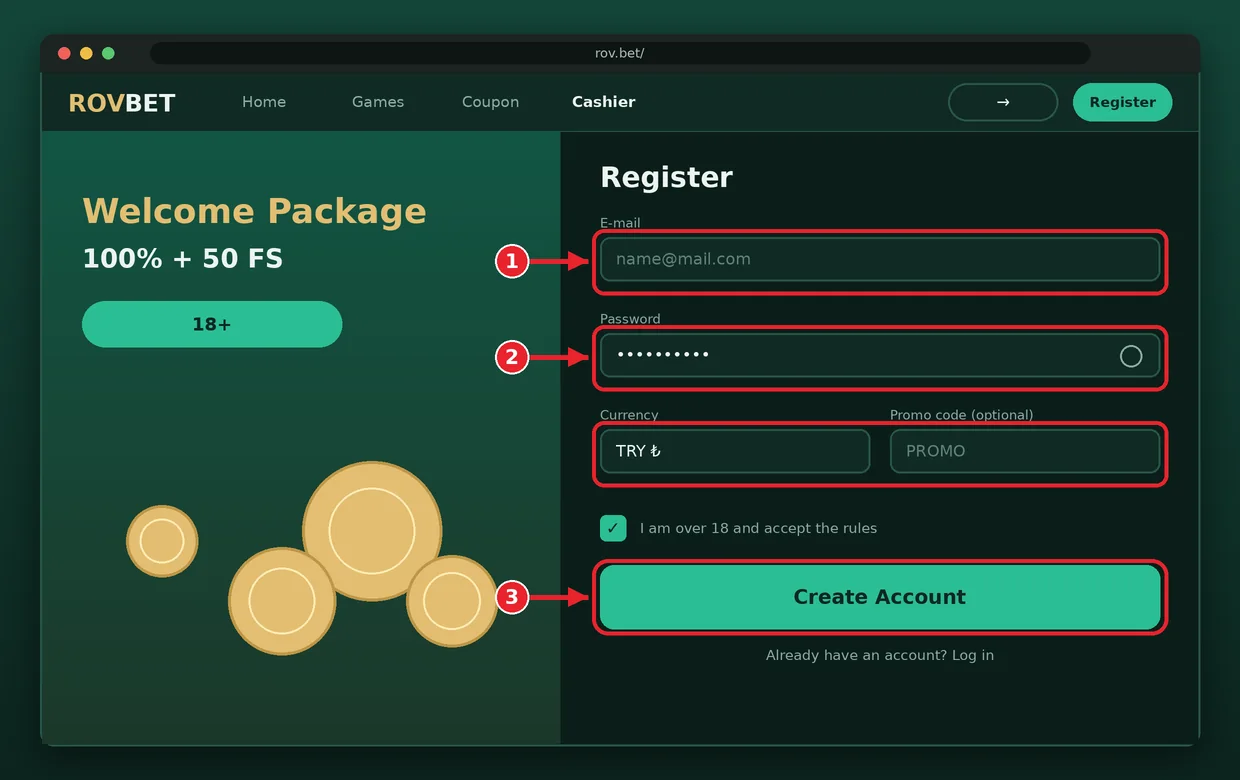
The form opens from the sign-up button on the home page and has sections for e-mail or phone, password, currency and personal details. Every field should be completed in the same way as on your ID.
The choice of currency may not be changeable later, so check the supported currencies in the cashier before you select one.
- 01
Open the form
Tap Sign Up on the verified address; stop if the form redirects to another domain.
- 02
Enter contact details
Use an e-mail address or phone number you really use, because the code is sent there.
- 03
Set a strong password
Combine letters, numbers and symbols and use a password that no other site has.
- 04
Fill in personal data
Enter first name, last name and date of birth exactly as on your document.
- 05
Confirm terms and age
Tick the 18+ confirmation and the terms only after reading them.
- 06
Verify the contact
Enter the code sent by SMS or e-mail to finish the registration.
The whole Rovbet sign up form takes a few minutes. Rovbet registration is complete only when the contact is verified; an unverified account can be limited later. Do not use a temporary e-mail, because it will block account recovery.
Activating the Welcome Package
The welcome package is normally a 100 percent match on the first deposit up to about 1,500–2,500 TRY with 50–100 free spins, and the minimum deposit is usually 100 TRY. A promo code is not required in most cases: the bonus is selected in the cashier when you deposit or it is credited automatically, and sometimes it is activated through live chat.
Read the terms before accepting. Wagering on the bonus amount is commonly 20–30 times for slots, or 10–15 times when deposit and bonus are counted, and the time limit is 7–14 days. A bonus that is accepted by mistake can be cancelled only under the cancellation rules, so decide before you pay. Full conditions are on the bonuses page.
Password Reset and Account Recovery
If you forget the password, use the reset link on the sign-in screen, enter the registered e-mail or phone and follow the link or code you receive. Open the link only if it leads to the verified domain, and create a new password that is long and different from the old one. A registration address that you no longer control is the hardest case, because recovery then goes through identity proof via live chat.
No agent will ask for your password. If the reset message does not arrive, check the spam folder and the spelling of the address, wait a few minutes and request it again once; many requests in a row can lock the form.
After a successful reset, log out of other devices, review the last login history and consider turning on a verification code if the account area offers one.
Common Login Errors
Most errors are caused by the address, the cache or a typing mistake. The table lists the usual symptoms with the quickest fix, and a Rovbet account that is flagged as locked normally needs a message to support.
| Error | Likely cause | Fix |
|---|---|---|
| Page does not open | Domain blocked or changed | Re-verify the address on official channels; do not trust numbered mirrors |
| Password not accepted | Wrong character, caps lock or old password | Type it by hand, use the reset link |
| Verification code does not arrive | Network delay or wrong number | Wait a few minutes, check the number, request the code again |
| Account locked warning | Several failed attempts or a security check | Wait for the lock to expire or contact live chat |
| Page loops back to sign in | Old cookies or an unfinished session | Clear the browser cache and cookies, then try again |
If the problem repeats, write to live chat with the time of the error, the device and a screenshot, and hide any personal numbers in the image.
Safe Login on Desktop and Mobile
Safe habits matter more than any setting. Use a password manager, a unique password and a device that is updated, and avoid logging in over public Wi-Fi. On desktop, check the address bar every time and keep a bookmark of the verified page; on mobile, use the home-screen shortcut because it removes the typing step that phishing relies on. Rovbet log in attempts from a new device should always be followed by a check of the login history.
Do not let the browser save the password on a shared computer, and log out when you finish. Keep your recovery e-mail secure, since whoever controls it controls the account. If you suspect a leak, change the password, contact live chat and watch the balance for unusual activity.
FAQ
Why is the Rovbet login page not opening?
The most common cause is that the domain has been blocked or replaced by a new address. Confirm the current link on the official Telegram and X accounts, then clear the browser cache and try another network. Resetting the password will not fix an address problem, and no account details should be typed until the address is verified.
How do I register at Rovbet?
Open the verified address, tap Sign Up and enter an e-mail or phone, a strong password, currency and personal details. Confirm that you are 18 or older, accept the terms and verify the code sent to you. Before the first withdrawal an identity check may be requested, so enter your name exactly as on the document.
What if I forgot my password?
Use the reset link on the sign-in screen and enter your registered e-mail or phone. Follow the link or code only if it leads to the verified domain, then set a new, long password. No support agent will ever ask for a password; if the message does not arrive, check spam and wait a few minutes.
How long does verification take?
The time depends on document quality and how busy the team is, so no fixed duration can be promised. Sharp, complete, current documents shorten it, while blurred or cropped images are rejected and must be uploaded again. Watch the account area and your e-mail for requests, and reply quickly with a clearer copy.
How do I find the current Rovbet address safely?
Take it only from the official Telegram and X accounts and from notices inside the site. Compare the domain letter by letter, check the HTTPS padlock and ignore numbered mirrors, shortened links and anyone asking for a password or code. Save the verified link in a note so you can return to it quickly.
In short, a safe Rovbet login rests on three habits: verify the address on the official channels, use a strong unique password with a verification code where available, and never share a code with anyone. Complete the identity check early, keep the recovery e-mail secure and use the Rovbet register button only after reading the rules. The platform is for adults aged 18 and over; if gambling stops being fun, open the responsible gaming page or call 0808 8020 133. Related guides: payments and mobile.